DS-160 Mistakes That Lead to B-1/B-2 Visa Refusals (2026)
By Visaora Editorial Team · Updated November 2026 · 10 min read
Quick Answer: The DS-160 is the one part of a B-1/B-2 application you cannot edit after submission. The mistakes that hurt most are a name or passport number that does not match your passport, a “no” where the truthful answer was “yes” — especially about earlier visa refusals — and answers that contradict what you say at the interview. Find an error after submitting? The fix is a new DS-160 and an updated appointment record.
Key takeaways
- A submitted DS-160 is locked. There is no edit button; corrections mean a brand-new form with a new confirmation number.
- An unsubmitted form can be retrieved for 30 days using your application ID and security answer — after that, unsaved work is gone.
- The session times out after about 20 minutes of inactivity, so save as you go and note your application ID on paper.
- The B-1/B-2 application fee is $185, paid separately from the form; filling in a replacement DS-160 does not mean paying the fee again.
- Consular officers compare the form with your interview answers and your records. A contradiction reads as a credibility problem, not a typo.
Most DS-160 problems are not dramatic. They are small, tired, end-of-a-long-form mistakes: a transposed passport digit, a previous refusal answered “no” out of embarrassment, travel dates that no longer match the plan you describe at the window. The form matters because it is the officer’s first version of you. Before you start, line up the documents behind your answers with the free Document Checklist Generator, and keep your passport beside the keyboard, not in another room.
Contents
- Why does the DS-160 carry so much weight?
- Which DS-160 mistakes do the most damage?
- Mistakes at a glance: fix before or after submitting?
- How do you fix a mistake after submitting?
- Example scenario: the refusal that started on a form
- How do you fill the DS-160 cleanly the first time?
- Common mistakes when filling in the DS-160
- Frequently asked questions
- Sources
Why does the DS-160 carry so much weight?
Because the interview is short and the form is permanent. When you sign and submit, you certify that your answers are true and complete, and the confirmation page’s barcode is what the consulate scans to pull up your record. The State Department’s own guidance warns applicants to answer accurately and completely, because errors can force you to correct the application and reschedule the interview. Under INA 214(b), the officer starts from the presumption that you intend to immigrate; a form that contradicts itself gives that presumption an easy win. Our guide to 214(b) refusals explains how that test works in practice.
Which DS-160 mistakes do the most damage?
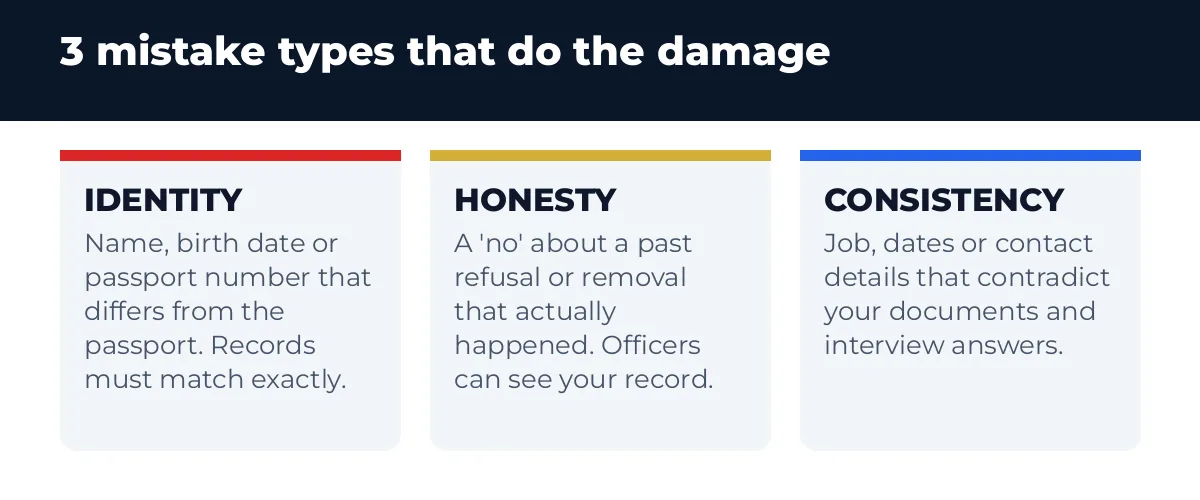
Three categories cause nearly all the trouble. First, identity errors: your surname and given names must be entered exactly as they appear in your passport — the State Department’s DS-160 help pages repeat this for names, date of birth and passport number — because a mismatch between the form, the passport and the appointment record can stall you at the door. Second, honesty errors: the form asks whether you have ever been refused a US visa, refused admission, or withdrawn an application at a port of entry. That covers a refusal from years ago and other countries’ decisions are asked about in their own questions too. Answering “no” when the record says “yes” is the single most dangerous box on the form, because a wrong answer about a material fact can be treated as misrepresentation, which is far worse than the original refusal. Third, consistency errors: an employer that does not match your documents, a US contact or address you cannot explain, travel dates that differ from your leave letter. Individually small, together they tell the officer your story is assembled rather than true.
Immigration agency? Qualify UAE leads free with Visaora Agency Leads → https://visaora.io/visaora-agency-leads/
Mistakes at a glance: fix before or after submitting?
| Mistake | Why it matters | How to fix it |
|---|---|---|
| Name, date of birth or passport number differs from the passport | The barcode record, passport and appointment must match; a mismatch can block or delay the interview | Before submitting: correct it in the form. After submitting: file a new DS-160 and update the appointment record |
| “No” to a previous refusal, removal or overstay that actually happened | Officers can see prior records; a false answer risks a misrepresentation finding | File a new DS-160 with the truthful answer and be ready to explain it plainly at the interview |
| Job, income or travel dates that contradict your documents and answers | Contradictions undermine credibility under the 214(b) test | Align the form, your documents and your spoken answers before the interview; refile if a material fact changed |
| Wrong consulate location selected at the start | The form goes to the post you selected; interviewing elsewhere creates a mismatch | Start a new DS-160 with the correct location and use its confirmation page |
| Losing the application ID or letting a draft expire | An unsubmitted form is retrievable for 30 days only; after that the work is deleted | Write the ID and security answer down immediately; save a copy of the form to your computer |
Last checked: November 2026 – Sources: US Department of State DS-160 guidance, linked under Sources below.
How do you fix a mistake after submitting?
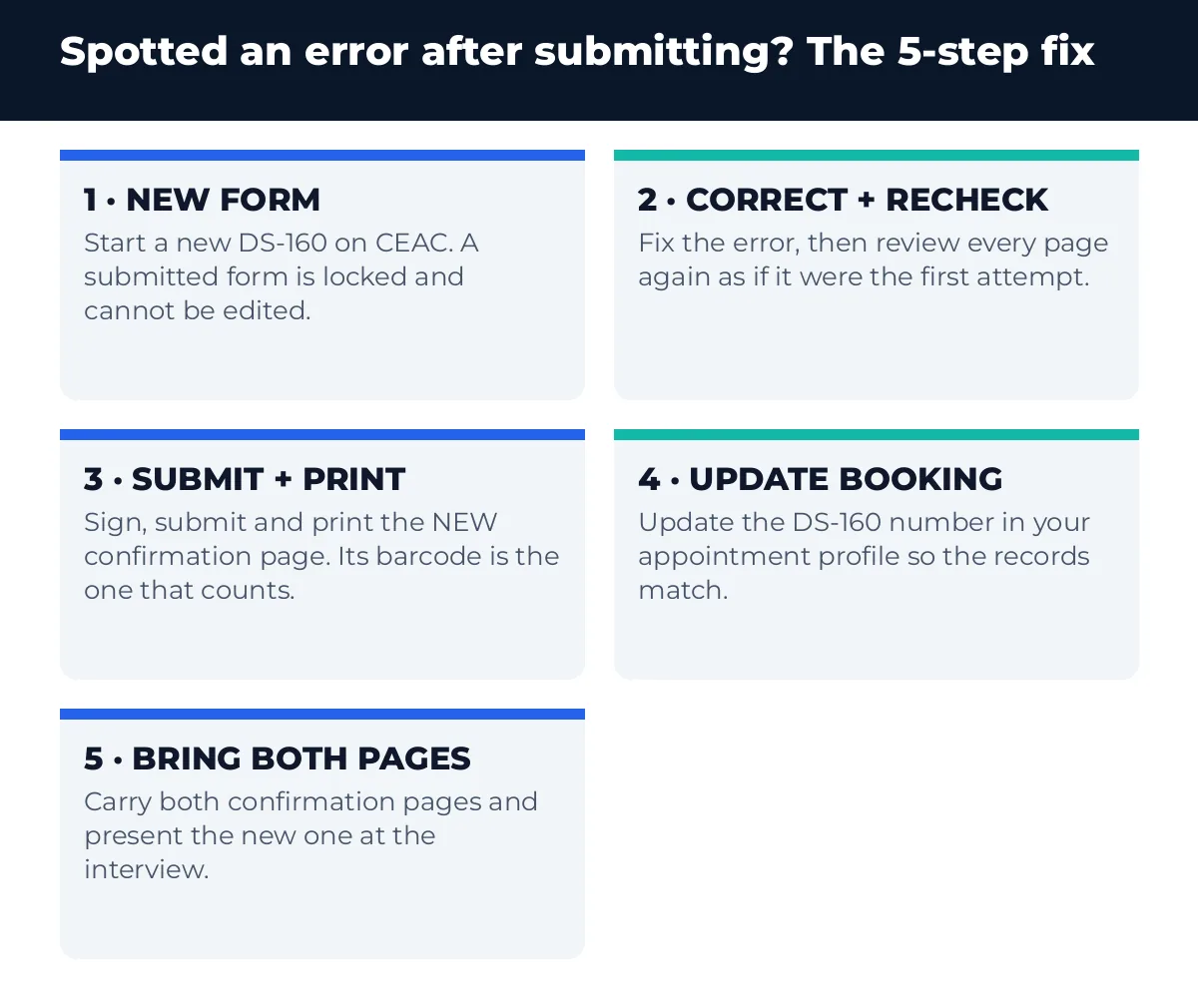
You cannot reopen the submitted form — but you can replace it. Work through these steps as soon as you spot the error:
- Start a new DS-160 on the Consular Electronic Application Center (CEAC) site. If your original application was submitted after 1 November 2010, the retrieval option can create a new application pre-filled with your earlier answers, so you correct rather than retype.
- Fix the error and re-check everything else. A rushed second form that introduces a fresh mistake defeats the purpose. Review every page as if it were the first attempt.
- Sign and submit, then print the new confirmation page. The new barcode number is now the one that matters.
- Update your appointment profile so the DS-160 confirmation number on your booking matches the new form. Do this well before the interview day, following your local US visa appointment service’s instructions.
- Bring both confirmation pages to the interview and present the new one. If asked, explain briefly and honestly that you found and corrected an error.
Minor slips in details that do not touch identity, eligibility or your history can often be clarified verbally at the window. Anything about who you are, your passport, or a yes/no question about your past deserves a fresh form rather than an explanation.
Example scenario: the refusal that started on a form
Example scenario (illustrative only, not a real case): Imran applied for a B-2 visa to attend his sister’s graduation. Eight years earlier his student visa had been refused. Embarrassed, and reasoning that it was “a different visa”, he answered “no” to the question about ever being refused a US visa. The officer asked about the earlier refusal within the first minute. Imran’s trip was genuine and his documents were strong, but the interview never recovered: the issue was no longer the trip, it was his truthfulness. A “yes” with a one-line explanation would have cost him nothing — the earlier refusal was already in the system either way.
How do you fill the DS-160 cleanly the first time?
Treat it as a two-sitting job, not a race. Gather your passport, previous US visas if any, your travel plan and your employment details before you open CEAC. Write down the application ID and your security question answer the moment you start. Save at every section — the session times out after roughly 20 minutes of inactivity and unsaved answers are lost. Before the interview, work through the documents our US tourist visa documents checklist describes, so the form, the file and your answers all tell the same story. The fee side is simple: the B-1/B-2 fee is $185, and Visaora’s US B1/B2 Visa Fee Calculator adds up the total for families applying together. Finally, rehearse against the B1/B2 Interview Prep Checklist and our interview preparation guide, so nothing on your own form surprises you at the window.
Common mistakes when filling in the DS-160
- Typing your name the way it sounds, not the way the passport prints it. The State Department instructs: surnames exactly as in the passport; if there is no given name, enter “FNU”.
- Letting someone else submit answers you have never read. You sign the form, so you own every answer in it — including an agent’s shortcuts.
- Answering the security questions on autopilot. The long yes/no section at the end is where tired applicants mis-click. Slow down; a wrong “yes” or “no” here is material.
- Guessing dates. Previous travel, employment start dates and your US trip should match your documents, not your memory of them.
- Losing the confirmation page. Print it and save the PDF the same day; you can reprint it later only if you can retrieve the application.
- Hand-writing corrections on the printed confirmation. Officers work from the barcode record. A marked-up printout fixes nothing and looks like tampering.
Frequently asked questions
Can I edit my DS-160 after submitting it?
No. Once you sign and submit, the form is locked and cannot be changed. To correct an error, complete and submit a new DS-160, print its confirmation page, and update the DS-160 number in your appointment profile so the booking matches the new barcode.
Do I have to pay the visa fee again if I submit a new DS-160?
No. The DS-160 form itself is free; the $185 B-1/B-2 application fee is paid separately through your local appointment system and is not charged again just because you filed a corrected form. Keep your original fee receipt safe.
How long can I retrieve an unfinished DS-160?
An unsubmitted application stays retrievable for 30 days, using your application ID and the answer to your security question. After 30 days of inactivity the saved data is deleted. Saving a copy of the application to your own computer protects you if the window closes.
What happens if my DS-160 and my passport details do not match?
A mismatch between your name, date of birth or passport number on the form and the same details in your passport can delay or block your interview, because the confirmation barcode, your passport and your appointment record must agree. Correct it with a new DS-160 before the interview rather than explaining it at the door.
Should I mention a US visa refusal from many years ago on the DS-160?
Yes. The question asks whether you have ever been refused a US visa, with no time limit. Consular officers can see your earlier records, so a truthful “yes” with a brief explanation is safe, while a false “no” can be treated as misrepresentation — a much more serious problem than the old refusal.
What if I chose the wrong embassy or consulate location on my DS-160?
The form is sent to the location you selected at the start, so a wrong location means your record is not where you will interview. Complete a new DS-160 with the correct location, and use the new confirmation page for your appointment.
Sources
- US Department of State — DS-160: Frequently Asked Questions
- US Department of State — Visitor Visa (B-1/B-2)
- US Department of State — Fees for Visa Services
- US Department of State — Visa Denials and INA 214(b)
Applying for a B-1/B-2? Build the file behind your form with the free Document Checklist Generator, and check the full cost with the US B1/B2 Visa Fee Calculator before you book.
Visaora provides software tools and general information, not legal advice. Rules change; always confirm with the official authority.
✈️ Planning Your Trip?
We may earn a commission — at no extra cost to you. Learn more